

How to create an Assignment for Student Groups in Canvas.
If you have a group assessment in your PAD you will need to set up a group assessment in Canvas.
Create your assessment as normal, including a suitable rubric that will allow group contribution to be assessed. You will be able to choose whether to assign a mark to every student in the group, or whether to assign marks individually. You can grade as a group and then alter the settings later so you can go back and adjust individual scores after giving a mark for the submission.
- Create an Assessment in Canvas as usual.
- Edit the Assessment. Scroll to the settings below the assessment instructions.
- Tick the box labelled This is a Group Assignment in the Group Assignment section.
- Choose whether to Assign marks individually to each student. To minimise your marking load, untick this in the first instance. This means you can mark the assessment once, and all members of the group have the same mark and feedback.
- Select a Group Set for this Assessment. See Group Sets for more information about this.
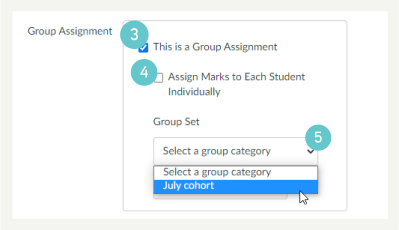
Using this setup, you can mark/feedback a submission by the group. Any score you give to the submitted assignment will be given to all students in that group.
After you have marked the work (using SpeedGrader), you can change the Assessment settings to allow Individual Marks. This will let you adjust an individual’s mark based on their group contribution.
- Scroll to the settings below the assessment instructions. Select Assign Marks to Each Student Individually.
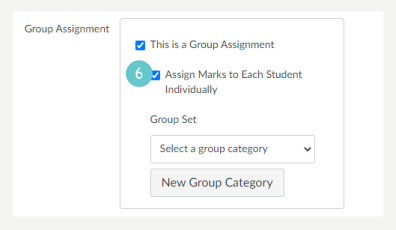
- Go to SpeedGrader or your Gradebook and adjust student marks/feedback as required.
Hints and Tips
Make sure there is a mechanism in the assessment to award marks for group contribution. You could do this by:
- Create a form for the group to fill in to comment on each other’s group participation. The group submits this as part of their submission
- Create a specific task and rubric item that states the expectations of the group, e.g. working as a team, dividing work up, equal contributions, etc
- Individually include a personal reflection for group participation that only you see
- Make the group take minutes from group meetings. The group submits these.
- These are just a few ideas on how to evidence that group work has happened and students’ participation recorded. There are many others. Make sure there is a rubric item for group participation.
- Grade the group submission first to minimise how much you mark, then adjust the assignment settings to allow you to adjust marks for individuals.