

The new Enhanced Rubrics feature is now available, giving rubrics a cleaner design and some long-awaited improvements. This update doesn’t change how rubrics work—but it does make them easier to read, faster to edit, and more flexible to use across your course.
What’s new?
The first thing you’ll notice is the streamlined layout. Rubrics now display in a tidy table format with clearer headings, better spacing, and easier-to-follow columns. It’s much more user-friendly, especially when you’re working with multiple criteria or larger rubrics.

Student View

Editing Got Easier
Instead of clicking in and out of tiny text boxes, you now get inline editing. That means you can update your rubric directly in the grid—no more back-and-forth clicking to open each level.
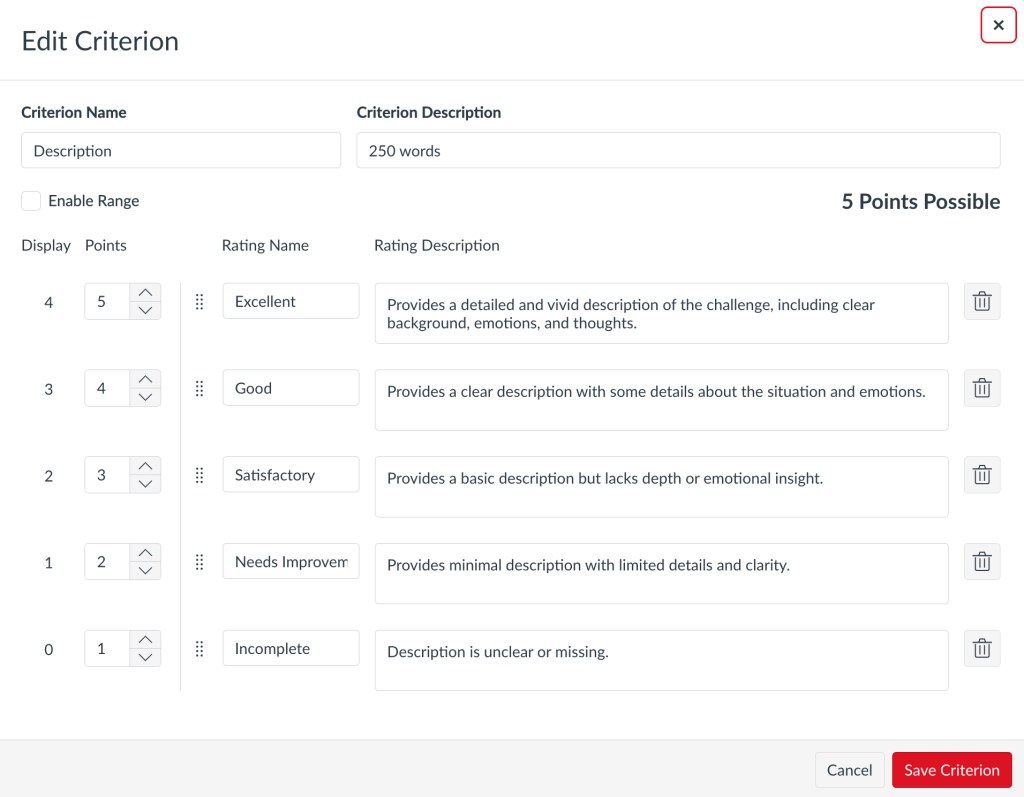
Other useful changes:
- Rubric sorting by rubric name, total points, criterion, and location used, and rubric search
- Drag-and-drop editing to re-order criteria
- Multiple display modes offering vertical, horizontal, and traditional views
- The ability to archive rubrics for future use or to restrict their use
Note: You cannot edit or delete a rubric once it has been added to an assignment. However, you can duplicate rubrics for additional edits or create new rubrics.
Enhanced Rubrics are available now inside all courses.
Need help or want to try it out?
- We’re happy to support you as you explore the new interface. Feel free to get in touch if you’d like help setting it up or testing it in your course.