

The following guide goes through the steps and the questions, you need to ask yourself as you are creating your assessments.
Assignment writing (or assessment writing) for Canvas is a process containing a number of constituent parts, from content, planning, delivery method or methods, timeframes, the level at which it is pitched, the learning that needs to take place before delivery of an assessment, to name a few of those considerations.
The following guide goes through the steps and the questions, you need to ask yourself as you are creating your assessments.
Planning
- Read your course descriptors. What are your learning outcomes? What assessments are specified (if there is only an exam worth 100% then consider doing a type 1 change)?
- Consider each learning outcome – what is the best way to know if this has been achieved by the learner?
- Does this type of assessment provide an opportunity for the learner to demonstrate competence?
- Will the learners learn something from the exercise?
- Are there resources available for the learner to complete this assignment?
- How will it be marked? Will it be peer assessed?
- Does the assignment need to be broken into parts to ensure the learner stays on track?
- Is it an individual, group or pair assignment?
- How will it be set up in Canvas?
- What support may learners need?
Details
- How many words (word count)?
- Due dates?
- Rubrics – what are you actually assessing?
- Timing for marking
Setting it up in Canvas
- If the assignment is going to be done in parts, these should be set up as an assignment group.
- Each assignment needs a meaningful name and a clear explanation of what is required.
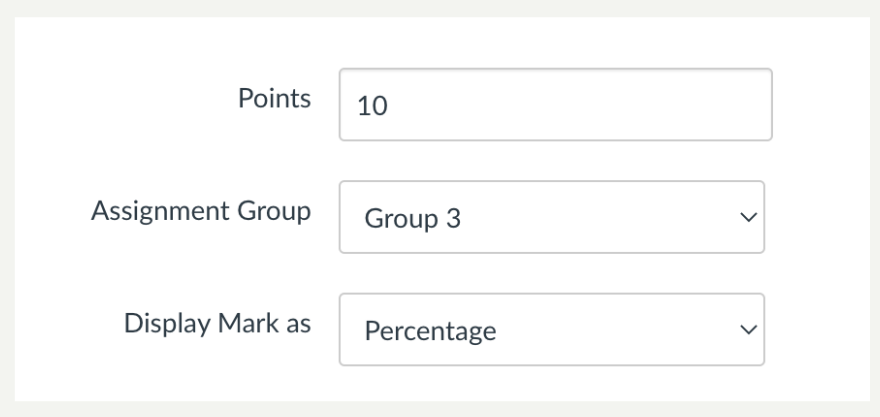
- Add in the number of points, the assignment group it belongs to (if applicable) and how to present the mark.
- Complete the details on the screen.
- When you save the assessment it will be listed with other assessments on the Assignment tab.
- The assessment will not be available for students to see until it is published.
- Click the circle to publish.

Pre-moderation
- Arrange for pre-moderation
Reflection on the assessment
- List 5 strengths and 5 weaknesses related to the assessment
- Ask for feedback from students
- Modify it for the next cohort
Moderation
- Ensure you have the marked assessments saved and filed for moderation purposes
- Refer to moderation guidelines for further details