An introduction on the Canvas assignment publishing status
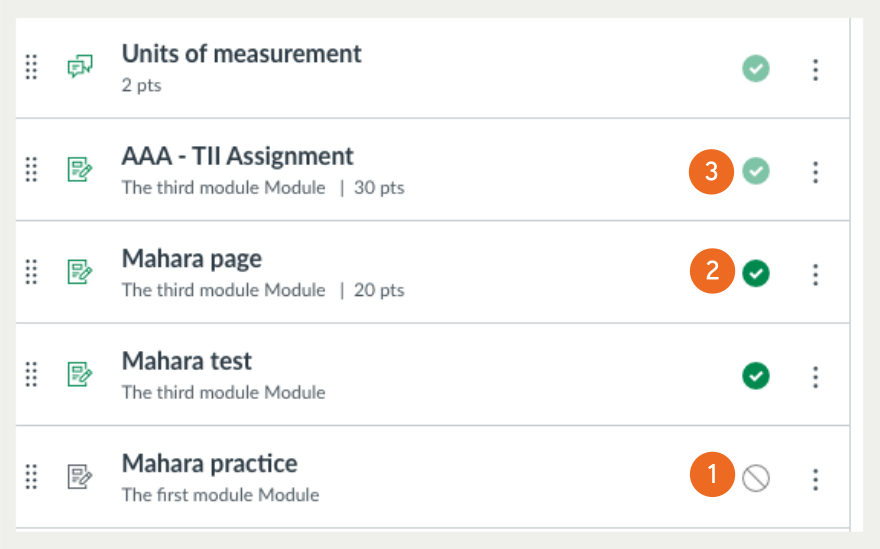
When creating a Canvas assignment or a quiz, it is not visible to the students until you have published it. There are several publishing states, with relevant icons for an assignment or a quiz at different stages. This allows you to control when assignments are made available to students and ensure that students only see assignments that are ready for submission and grading. It also provides you with the flexibility to work on assignment details without impacting students’ access to the course content.
- Unpublished – Unpublished assignments or quizzes are hidden from students’ view within the course. This status is typically used when you are still working on assignment details or are not ready for students to access the assignment. Unpublished assignments cannot be viewed or accessed by students, and they do not appear in the gradebook until you publish them.
- Published – When an assignment or a quiz is published, within the assignment available period, it is visible to students in the course. Students can view the assignment or the quiz details, instructions, due dates, and submit their work. Published assignments are part of the course’s gradebook, and the grades and feedback you provide can be visible to students after they are posted.
- Published but cannot be unpublished – The assignment or quiz is published, and some students have already submitted their work. At this stage, it cannot be unpublished. But you can still edit the descriptions, instructions and due dates. However, you are not recommended to edit the questions and their marking rubrics to ensure marking consistency for all students.