

The following information outlines how to extract student results for Moderation purposes. This is done on an individual student result basis.
- In Course Navigation, click the People link.
- Select the learner whose results you wish to print.

- In the window that appears, select Marks.

- You are presented with a summary of the student Marks.

When it comes to printing out the results for moderation, you have a number options available to you, depending on how detailed or deep you require the results to be.
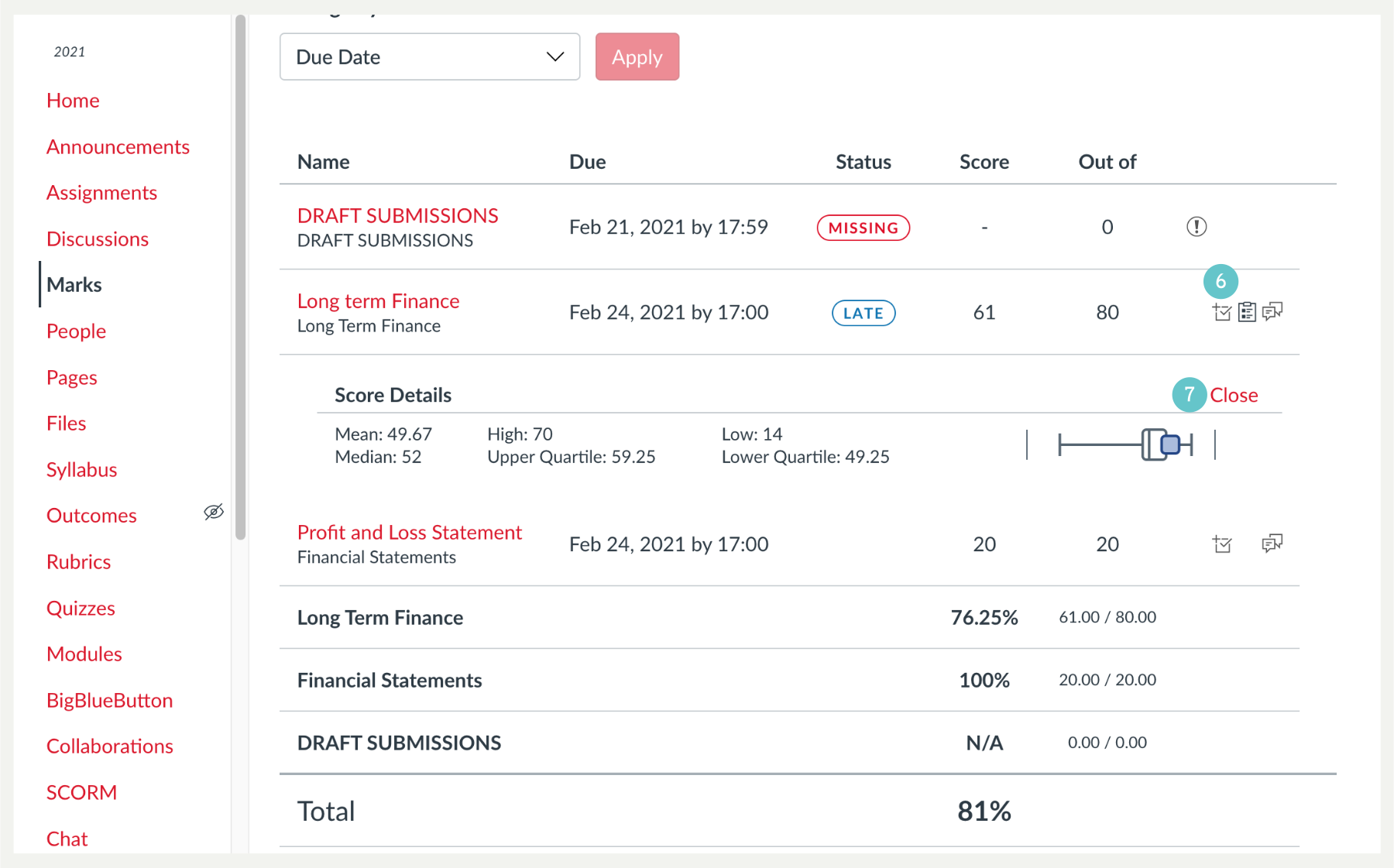
- Looking at the enlargement of assessment area we can see 3 icons to the right of by clicking on these individually you can reveal and hide details that may or may not be required.

- Clicking on the first icon reveals Score details, which give the students mark and shows class Medium, High and Low scores.
- Clicking on Close will hide the information
- The second icon adds the Marking Rubric associated with the assessment. Close Rubric will hide the Rubric again.

- The third icon reveals markers comments, clicking on Close will hide them again.

- Once you have determined what you wish print out for Moderation purposes, Click Print.

- Choose PDF, from the menu and Save, this makes it easy to redact the students name afterwards.

- The end result is a multi-page PDF file, ready to be redacted in Foxit pdf editor program.
