

This article explains how to correctly store items in the Moderation folder in SharePoint.
“MIT is legally obliged to store materials for seven years including moderation. This means that when an assessment is moderated, all materials related to this assessment must be stored according to the MIT File Storage Protocols (MIT FSP).
Is this for me?
- If you are writing or assessing assessments: Upload all materials that need moderation to the Moderation folder in SharePoint. This is where your Moderator will access them.
- If you are a Moderator: You will receive a moderation pack with the materials you need. Save your completed moderation report in the Moderation folder.
- If you are an Academic Lead Quality: Check that all moderation activities are saved in the Moderation folder. You are responsible for making sure this is done.
- If you are a Head of School or on the Programme Committee: You oversee moderation in your school. Use the Moderation folder to find all related materials
Where is the Moderation folder on SharePoint and what’s in it?
Moderation folder
The Moderation folder contains all of the files, resources and evidence for moderation for all programmes and training schemes. This includes moderation plans, tracking sheets, moderation reports, and materials including assessments and marked student work that were submitted for moderation.
You along with other lecturers, School management and leadership in your discipline area can access the Moderation folder to add, update and check activities.
Subfolders
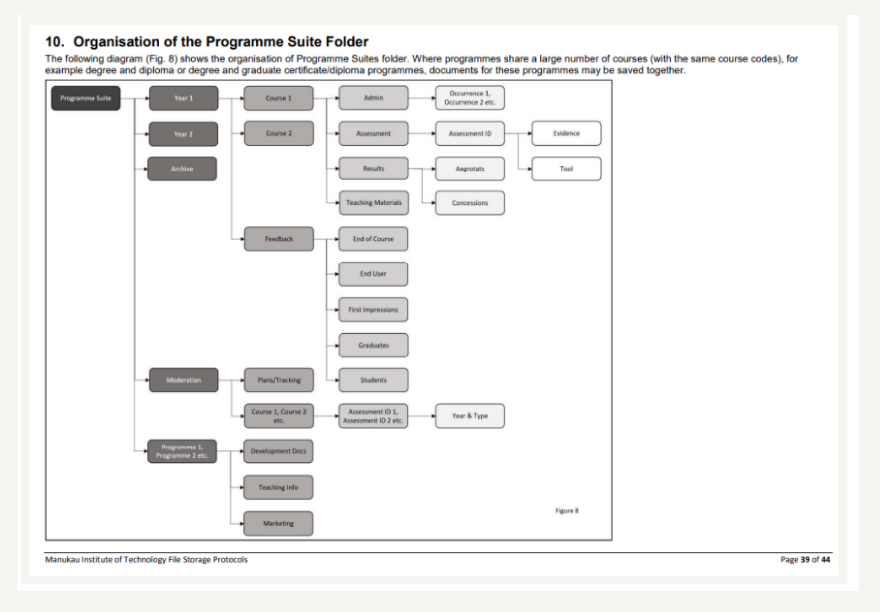
The Moderation folder contains a number of subfolders:
- A Planning/Tracking folder contains the MP&TT file for the School/discipline area. The file is approved/reviewed at Programme Committee.
- Programme/Course/Assessments/Year & Type folders. Some courses/assessments are part of multiple programmes. The MIT FSP states that Moderation is stored: Programme, Course, Assessment then Year and Type. For some Assessments that occur in multiple courses/programmes, it’s not expected that paperwork is duplicated. Follow the FSP wherever possible. The MIT FSP is reviewed annually. If there’s a specific problem that goes against the stated structure, contact academic.quality@manukau.ac.nz for clarification.
How does a Programme Committee use SharePoint?
Copies of Moderation reports and evidence must be tabled regularly at Programme Committee (PC). The PC cannot just link to the main Moderation folder, or files within it. Copies must be made of the documents and placed in the PC meeting folder. This is so that it is clear which items are tabled at that particular meeting, and there’s an accurate record of the version of those files that were approved/tabled in that meeting.
Hints and Tips
- You need to know where to find your programme’s moderation planning and tracking so you can keep your programme’s compliance up to date. Ask your Academic Lead Quality where to put/find moderation files.
- Together with the Academic Leads, as a member of a teaching team, you need to co-ordinate how and when you complete marking and moderation so course results can be approved and released to students within 10 days of the end of the course. Make sure all evidence is in the Moderation folder by the time the Programme Committee need it.
- Use the structure in the MIT File Storage Protocols