

This will explain how to check/set your Grade Posting Policy in Canvas.
The page tells you about Canvas’ Grade Posting Policy and shows you how you should adjust the settings so that marks are not released to the students prematurely.
Important: You do not want assignment marks visible to the students as soon as you’ve graded their work. You should release the marks as a class batch, and you need to make sure they’ve been check-marked/post moderated if necessary first.
There are two-grade posting settings in Canvas
- Course Grade Posting Policy
- Assessment Grade Posting Policy
You need to check/change both of these settings. Canvas has a default setting that all marks in the course are posted automatically. You need to change this setting.
- Click Marks in the Navigation menu
- Click the Settings cog at the top right of the page

- Click the Grade Posting Policy tab
- Click Manually Post Grades
- Click Update

You have now set the Grade Posting Policy for the course as a whole to Manual. The course level setting has overridden any Assignment level Grade Posting Policy. Check an Assignment to make sure this is true.
- Click on the three dots next to an Assignment
- Select Grade Posting Policy
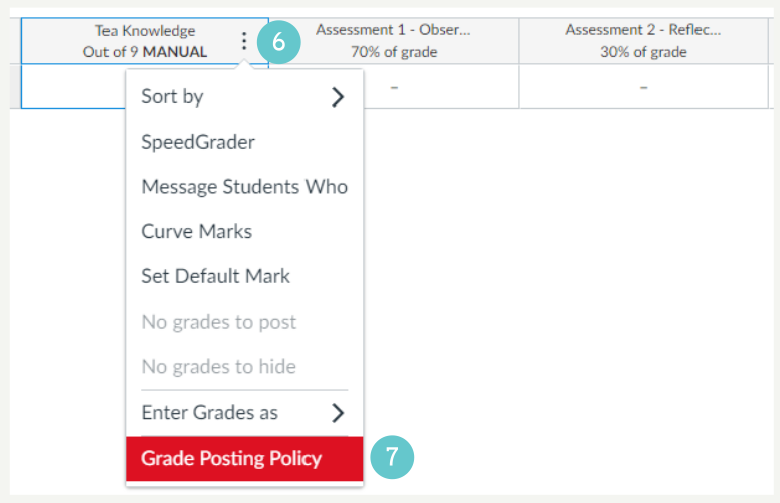
The Grade Posting Policy appears on the right. Confirm that it says Manually.
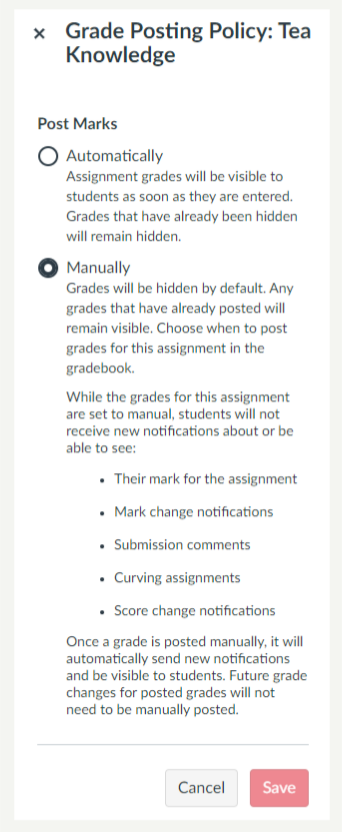
You should not change either the course level, or Assignment level settings to Automatically. Make sure that the course level settings are Manual to override any other setting.