

How to import content from another Canvas course into this one.
You can copy course content such as assignments, modules, pages, and discussions from previous Canvas courses into existing courses. You only have access to copy content from courses in which you are enrolled as a user with instructor permissions.
- Click Settings in the navigation menu.
- Click Import Course Content from the menu on the right.

- Select Copy a Canvas Course from the drop-down menu. This adds further options to the screen.
- To Search for a course, type all or part of the name, and after a few seconds a list of courses with similar names will appear. Pick carefully from the list – make sure you import the correct occurrence of the course.

- Choose either All content or Select specific content. You will be able to select which specific content in a moment if you select that option.
- Click Import.
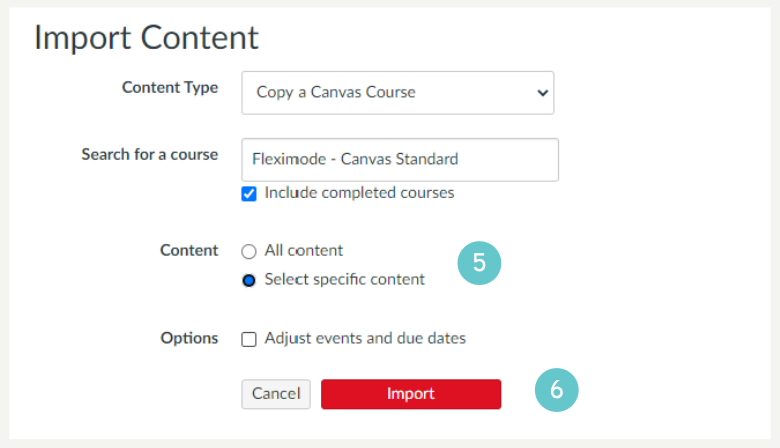
If you picked Select specific content you can select the specific content you want to import.
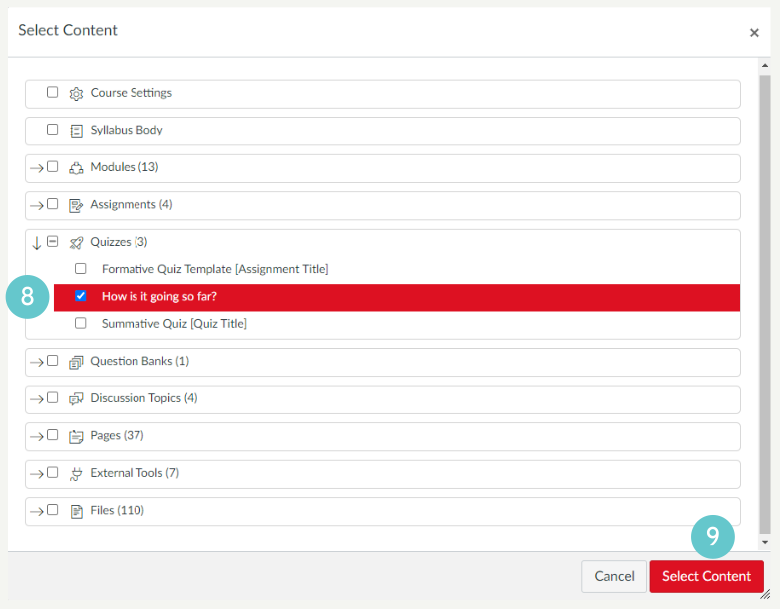
- Click Select Content. You will see a structure containing the course item. You can expand any of the items e.g. you could just import a specific Module or Quiz if you want.

- Select all the items you want to import
- Click Select Content. Your import will be queued, and content will be imported. It may take a short while if you are importing a lot of content.
Hints and Tips
- We recommend you import content from another course before editing content in your fresh course.
- Be careful when you import content. Check settings of the course after importing content (e.g. grade posting and assignments) and check any existing content hasn’t been adversely affected.