

How to use the MIT Moderation Planning and Tracking Tool to enter accurate information.
The Moderation Planning and Tracking Tool (MP&TT) is an Excel spreadsheet that helps keep your programme’s moderation activities organised for the whole year. It records when internal and external pre-moderation, post-moderation, and check marking take place, along with the results. It also keeps track of any follow-up actions from Programme Committee meetings, so nothing is missed.
You use the MP&TT sheets to log moderation activities as they happen. Most Schools store their copy in the SharePoint moderation folder, making it easy for all moderators to access and update. This shared system helps keep assessments fair, consistent, and up to standard. When the School copy is kept up to date, the Academic Lead Quality can quickly add the latest information to the live sheets that feed into the PowerBI Moderation Dashboard — giving everyone a clear picture of progress.
Using the MP & TT Sheets
The flowcharts below guide you on which columns to complete in the MP&TT sheets. Start by answering the questions in the diamond shapes at the top left of each chart — your answer will show you which columns to fill in.
When entering information into the MP&TT, always use the drop-down menus. This makes sure your data is accurate and easy to track.
Chart 1 helps you decide which columns to complete by first asking if the assessment is being delivered in the current year. Your answer will then guide you to the correct sections of the MP & TT sheets.

Chart 2 helps you track if the assessment has been delivered before, and which columns to complete in the MP & TT sheets

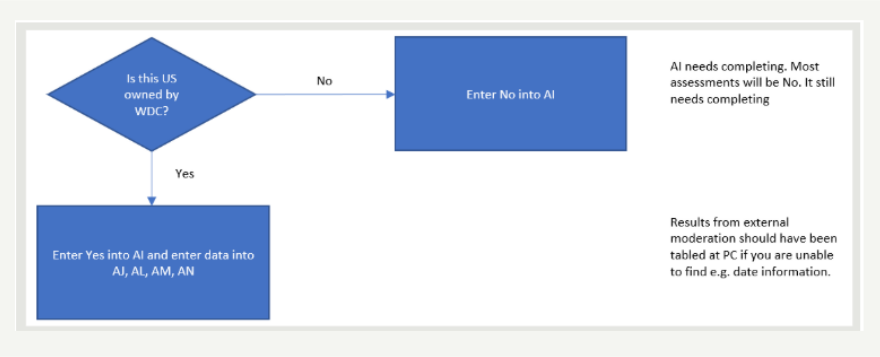
Chart 3 guides you through completing the Unit Standard moderation section. It first asks whether the Unit Standard is regulated by a Workforce Development Council (WDC). If you select “No”, the rest of the section will fill in automatically — saving you time. For more information about what’s required for external moderation or moderation of assessment standards, check the AC4-3-Moderation-Procedures for full details.
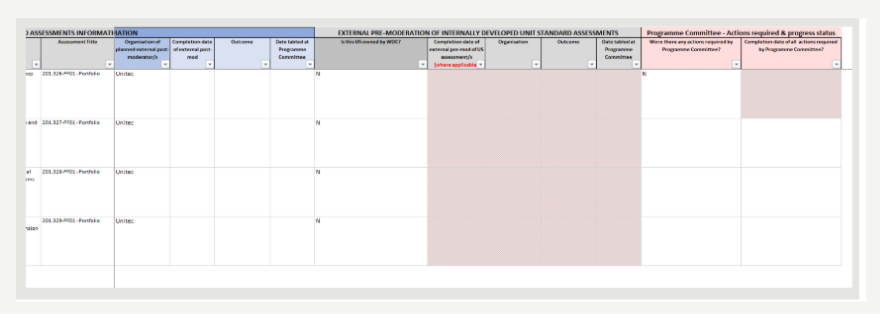
Use Chart 4 to record any actions that must be completed before the assessment can be used again. These actions may come from the Programme Committee, the WDC, or NZQA. You must complete this section if there are actions recorded in the minutes. If there are no actions, enter “N”. This will disable the action column and let you move on to the next step.
- Update the MP&TT spreadsheet.
- Your changes will update overnight. Check the PowerBI Dashboard the next day to confirm your updates have come through.
- Store your documents correctly.
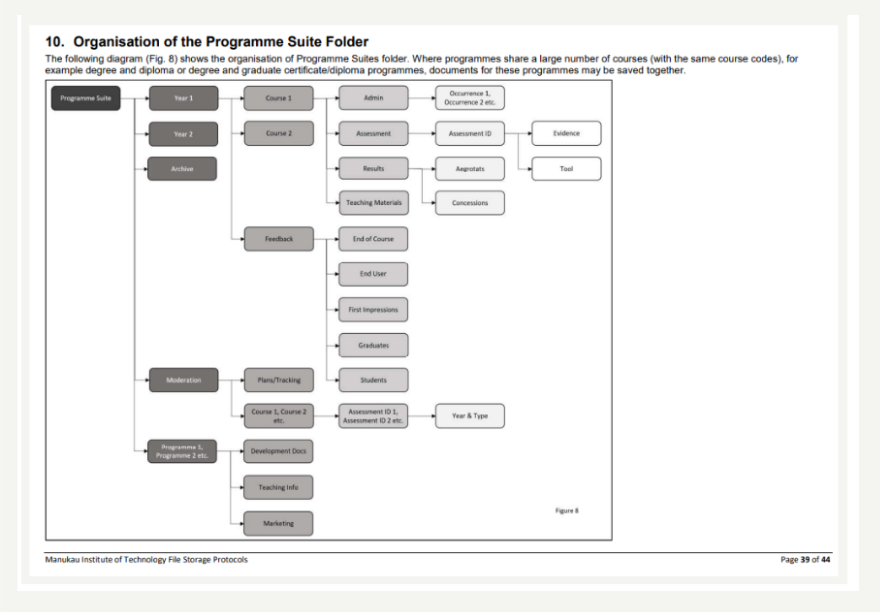
- Save the following in line with the File Storage Protocols:
- Moderation reports
- Assessment tools
- Moderated assessment samples
- Notes to Moderator (if used)
Make sure everything is saved in the right folder and organised so it can be easily found later.

Inside the Moderation folder, make sure all the assessment files that were in the moderation package are stored correctly:
- Moderation reports
- Moderation matrix
- Any other related files in the Course folders:
Hints and Tips
- The MP&TT works best when it is updated after completion of each moderation activity.
- Having a copy of the MP&TT in the SharePoint moderator allows each assessor and moderator to take ownership of tracking their programme’s compliance and progress. This saves the AL Quality from chasing everyone up.
- Refer to the Knowledge Base Page What is the MP&TT for information on what the MP&TT is, and its purpose.
- You can find details about what’s required for moderation in the Moderation Procedures (AC4/3).