

This article set out conventions for naming the folders and files used by Programme Committees that will enable consistent practices across Schools and Campuses.
All PCs need to ensure that all documentation related to each meeting is filed correctly.
Why keep Programme Committee documents in one place?
Programme Committee meetings are formal meetings of MIT and are governed by specific requirements and procedures as set out in the MIT Council Standing Orders
The MIT File Storage Protocols address how folders for Programme Committees are to be set up (see picture below).
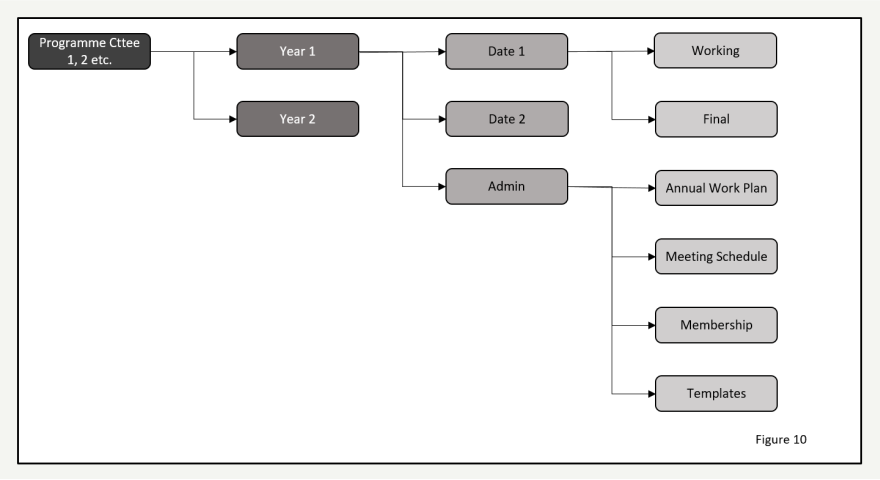
Year/Date Folders
The Year/Date folder contains all of the files and resources for the Programme Committee meeting on the date specified, in the identified year. There will be one folder set up for each meeting date in that year. The Date folder name must be in the format YYYYMMDD, e.g. 20221001. This guarantees that folders remain in chronological order.
If you need to add a description AFTER this date, e.g. ‘Results Sub Committee’ so that Sub Committees are easily identifiable, please do.
The Working/Final Folders
The File Storage Protocols will be updated to remove the Working folder.
It is easier to not use Working and Final. Simply put all files for a meeting inside the Final folder. There is no need to use a Working folder. Inside the Final folder, please create an Archive folder if necessary for any files that are submitted to the PC meeting, but are subsequently replaced/removed etc.
All papers to be presented at the meeting should be collected here in subfolders Minutes and Papers folders.
The Minutes folder contains the minutes is THIS meeting (at the time of the meeting it is empty. After the meeting the draft and final minutes are put into this folder). The final minutes from the meeting should also be saved in this folder once they have been approved by the Committee and signed by the Chair after the next meeting.
The Papers folder includes the draft agenda and the draft minutes from the previous meeting that need approval at this meeting.
It is important that the Papers folder contains all the final documents required for the Programme Committee meeting including the final agenda and papers. All these files are the files tabled at the meeting and for which a resolution was passed. All papers in these folders show the papers as they were at that point in time as an accurate reflection of the documents discussed. Do not link to other files, e.g. Moderation tracking took, because linked files might change. A COPY of the file needs to be put into the PC folder for that meeting.
Naming Convention of the Final Folder
Below is a naming convention. Stick to it:
- PC (Programme Committee)
- 05 (Month – May in this case) – if there are two meetings in one month, the contents will be in different folders, so don’t worry that both meetings have 05 in them.
- 1-17 – These numbers are the item number of the agenda
Here are some examples of paperwork that could go into those folders:
05_01 is apologies for May’s meeting (unlikely to be a paper, however, if there are emails from people, they can be filed in this folder)
05_02 Administration – if there are changes to PC membership, the membership would be tabled here, as would change to the annual work plan
05_03 – The minutes from the last meeting
05_04 – A table of matters arising (this is a separate table, not a table on the bottom of the minutes, and the only items on this table are items for PC members. This table does not include administrative items).
05_05 – Inwards and outwards correspondence to/from the PC
05_6-9 – Written regular reports form Academic Leads
05_10 – e.g. minutes of the student advisory sub-committees, FIS and MyKoha survey reports
05_11 – The Monitoring action plan (if applicable) PER Action plan.
05_12 – Pre- and Post- moderation reports, check marking reports and annual moderation plan (MP&TT)
05_13 – Minutes from Industry advisory committees, emails with industry etc.
05_14 – Literacy and numeracy reports (from the LNAAT tool) and any emails of outstanding students
Items for Decision
These items must contain papers. The PC cannot approve/endorse an item without paperwork, e.g. Type 1 changes, graduand lists, results (including results from previous results subcommittees)
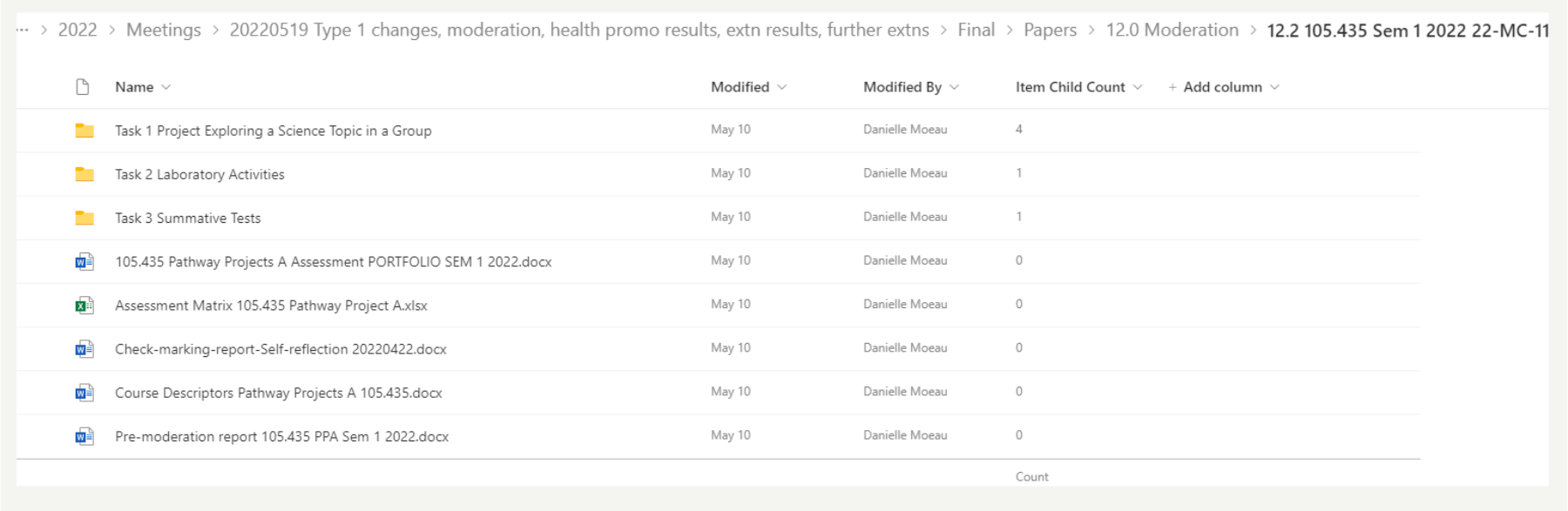
All papers must be stored in relevant folders (see below for example – Minutes is one document – it didn’t get a folder)
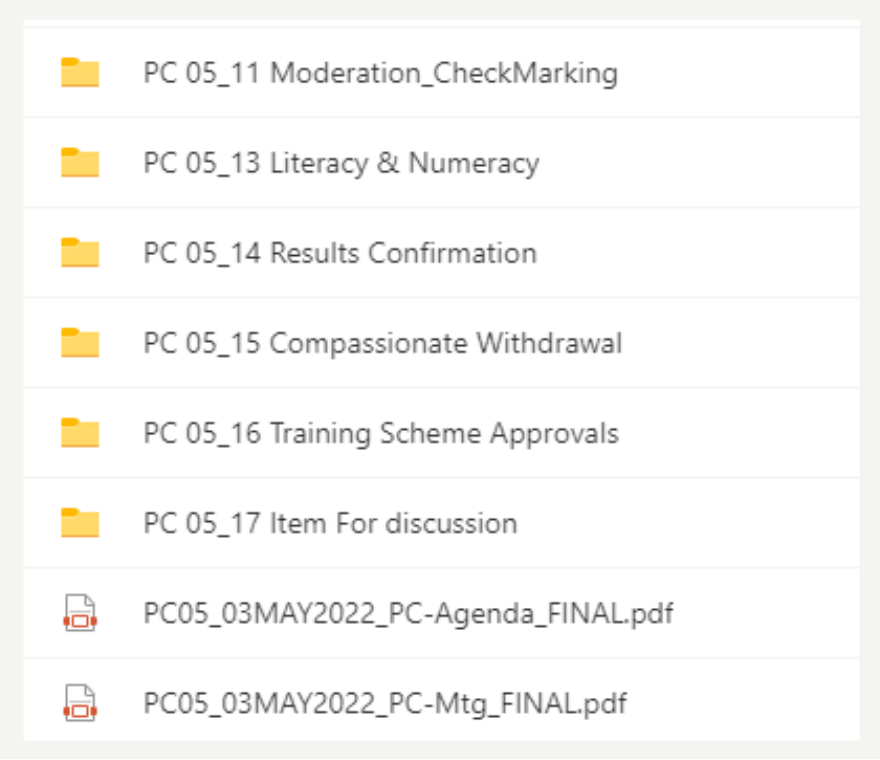
Below is an example of items in a subfolder, in this case agenda item 12 Moderation:
Hints and Tips
- If there are not many papers for tabling and approving, separate folders do not have to be created – so long as the item is clearly labelled with the agenda number, it can sit outside a folder
- All folders in the Final folder should contain relevant items.
- Folders and items should be named according to the Agenda items required for that meeting.
- There should be no hyperlinks to items and folders outside of the PC folders for that meeting.