

How to copy a rubric so that you can reuse it without having to make a new one from scratch.
The MIT Canvas Standards template contains example rubrics. It contains one for achievement-based assessments and one for competency-based assessments. You can make a copy of these rubrics and change the words in the criteria and the rating columns. The is much quicker than creating one from scratch.
There isn’t a ‘copy’ button as such, but you can import a rubric you already have in this course into this course, which is effectively like copying. Or you can import a rubric from any other course too.
Learn more about Rubrics here.
- Click Rubrics in the Navigation Menu. Identify which rubric you want to copy.
- Click Settings in the Navigation Menu.
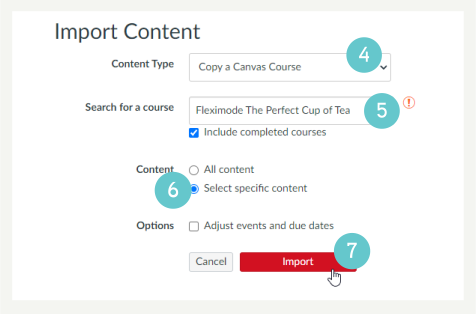
- Click Import Course Content on the right of the page.

- Select Copy a Canvas Course from the drop-down menu.
- Select the current course that you are in from the Search for a course box.
- Choose Select specific content from the Content radio buttons.
- Click Import.
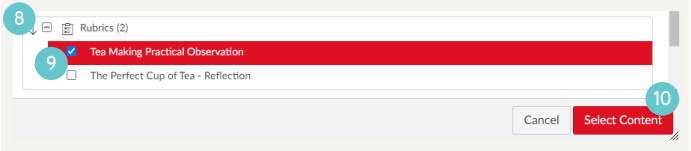
- Click the right facing arrow to the left of Rubrics.
- Select the rubric you want to copy.
- Click Select Content.
To edit a rubric:
- Click Rubrics in the Navigation Menu.
You can see which rubric has been added because while it’s got the same name as the original rubric, it has (1) after the name. This is the rubric you want to edit.
- Click Edit Rubric on the right of the page.
- Use the pencil in the top right of each box to edit as you need, including Rating Score as well as Rating Description.
- Make sure you edit the totals on the right correctly.
Now you can attach the rubric to any assessment:
- Click Assignments in the Navigation Menu.
- Click on the name of the assessment.
- Click +Rubric
Hints and Tips
Make sure you identify which rubric you want to use before you start the import process. Jot down the name of the rubric if that helps.
- You don’t have to have created the assessment already in order to import the rubric
- Remember to edit the rubric and check it against the assessment carefully, especially for LOs, scores, totals.
- Make sure you use pre-moderated assessments and rubrics.